Keyless Entry and Card Readers for Austin Businesses
Cards, fobs and phone credentials, issued individually and switched off the moment someone leaves. This is where a door starts telling you who came through it.
The Basics
One Credential, One Person, One Record
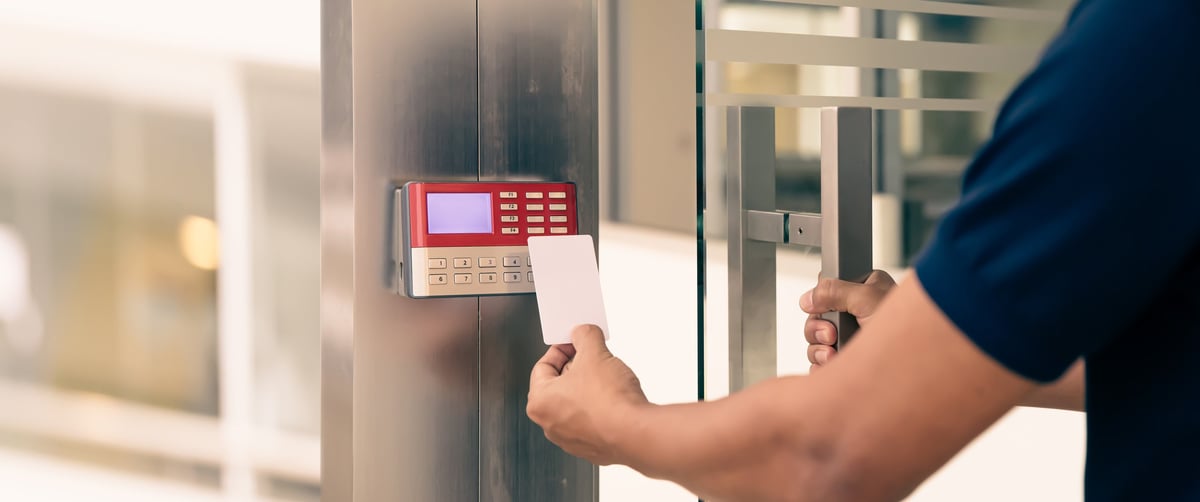
A keyless entry reader sits beside the door and looks for a credential. Hold a card, a fob or a phone near it, the reader checks whether that credential is allowed through that door at that time, and if it is, it releases the lock.
The reader does not hold the door shut. That is done by an electric strike in the frame or a magnet on the header. The reader is the decision, the hardware is the action, and the two get specified together.
What separates a reader from a shared keypad code is that every credential belongs to one person. Remove one and nothing changes for anybody else. Depending on the system, you also get a record of which credential opened which door and when, which turns a locked door into something you can actually check after the fact.
What You Hold Up to the Reader
Cards, Fobs and Phones
Proximity Cards and Fobs
The familiar option. A card in a wallet or a fob on a keyring, held near the reader. Cheap to issue, easy to replace, and the format most existing buildings already run.
Smart Cards
Encrypted credentials that the reader and the card authenticate to each other. Considerably harder to copy than older proximity formats, and the direction most new installs go.
Mobile Credentials
The credential lives on a phone and opens the door over Bluetooth or NFC. Nothing to hand out, nothing to collect back, and people are less likely to leave their phone at home than a fob.
Worth knowing if your building already has readers: older 125 kHz proximity credentials were designed before cloning was cheap, and a blank card and an inexpensive copier is all it takes to duplicate one. If your cards have been in circulation for years, that is worth checking. We can tell you what format you are running during the free security audit.
Where They Work Best
Doors We Fit Readers To
Main Entrances
The front door of an office or facility, where you need everyone in and nobody else, and you need to know who is in the building.
Multi-Tenant and Shared Buildings
Each tenant gets their own credentials on shared doors, and access ends the day their lease does. No rekeying, no collecting keys back.
Restricted and Regulated Areas
Rooms where you need a record of every entry, not just a locked door. Records rooms, labs, pharmacies, cash handling and anywhere an auditor may ask the question.
Gyms, Studios and Member Access
Member access outside staffed hours, with credentials that switch off when a membership lapses and switch back on when it renews.
The Service
Specified, Installed and Handed Over Properly
We install keyless entry systems across Austin and Central Texas, from a single reader on one door to multi-door systems with individual credentials and access schedules. That covers specifying the reader and credential format, fitting the locking hardware, running the wiring, setting up the controller and software, enrolling your people, and testing every door.
The part that gets skipped elsewhere is the handover. A system nobody knows how to administer becomes a system where the leaver's card never gets deleted. We show you how to add a person, remove a person, change access hours and pull a report, and we leave you a simple written guide for your specific setup.
If you already have readers and want to know what you are actually running, book a free security audit. Emergency service is available 24 hours a day, 7 days a week.
Common Questions
Keyless Entry FAQs
On systems that support mobile credentials, yes. The credential sits on the phone and opens the door over Bluetooth or NFC. It removes the job of issuing and collecting physical cards, and people tend to notice a missing phone far faster than a missing fob. Whether your existing readers support it depends on the hardware, which we check on site.
You delete that credential and issue a new one. Nobody else is affected and no locks need changing, which is the main practical reason businesses move away from keys. If the system supports it, you can also see whether the lost card was used after it went missing.
On most networked systems, yes. Each entry is recorded against the credential that was used, so you can look back at a specific door or a specific person. Standalone readers vary in whether they keep a log at all, which is one of the things we confirm before recommending a system.
Older 125 kHz proximity credentials were designed before copying was cheap and easy, and they can be duplicated with inexpensive equipment. Encrypted smart card formats and mobile credentials are considerably harder to clone. If your credentials have been in circulation for a long time, it is worth finding out which format you are on.
It depends on how many doors, the reader and credential type, the locking hardware on each door, the wiring, and whether the system is standalone or networked with software. One door is a very different job to a building. We quote after a free site audit, with clear pricing and no hidden fees.
“He setup our gym, Gameday Barbell, with the perfect door access control to where users can open the door through our app via bluetooth. We used to have so many problems with our old door system at a different location but this door control has been flawless!”
Karan Gujral, Gameday Barbell, Google review
Ready to Secure Your Doors?
Tell us about your property and what you need. We will put together a clear, no-obligation quote. There is no charge and no pressure.